
Payment Module
This page explains how to use the Payment Module provided by the Playol SDK to implement in-game purchase features, including scenarios like virtual item purchases and ad removal, without needing to integrate payment channels yourself. It provides players with a secure and convenient payment experience.
The Payment Module encapsulates the complete payment process and security verification mechanisms. It supports various payment scenarios and modes. Developers only need to call simple SDK methods to complete payment integration. All payment operations ensure data security through encrypted communication.
📌 1. Use Cases
- Instant top-up for packs/skins/numerical items;
- Direct purchases outside of rewarded ads (e.g., ad removal, gift packs);
- Platform-managed settlement: No need to connect payment channels; handled uniformly by the platform;
🧩 2. Methods & Calling Methods
The Payment Module initializes automatically when the SDK loads. Initialization failures will display error messages in the browser console.
💳 Initiate Payment
createPayment(params: PayRequest)
Creates a payment order and initiates the payment process.
| Parameter | Type | Required | Description |
|---|---|---|---|
| item_code | string | ✅ | Item Code,It needs to be obtained from the products configured on the Developer Platform |
window.playolSDK.pay.createPayment({
  itemCode: "COIN_300",
})
📌 Return example:
 {
   "orderId": "1942145682607271937",
   "itemId":"1942145682309476359"
 }
📌 Callback Result:
- If the order is created successfully, orderId and itemId are returned; if the order creation fails, msg contains the reason for the error (such as excessive frequency, missing parameters, etc.)
orderId: Order number, used for subsequent payment status and result queriesitemId: Product ID, identifying the specific product for this payment
📦 Query Payment Information
getPaymentInfo(orderId: string)
Queries the latest payment information for a specified order.
| Parameter | Type | Required | Description |
|---|---|---|---|
| orderId | string | ✅ | Order ID (returned after successful order creation) |
window.playolSDK.pay.getPaymentInfo('1942145682607271937')📌 Return Instructions:
| Value | Description |
|---|---|
data | Encrypted data |
orderId | Order ID |
orderStatus | Order status (0 Pending Payment, 1 Success, 2 Failed, 3 Refunded, 5 Cancelled) |
sign | Signature |
signTime | Signature time |
uuid | UUID |
If the authenticity of the queried order information needs to be verified, the backend should verify it by itself using the platform's private key.
🗂️ Payment data storage
If there is no game backend server to handle the payment results, you can use the set function provided by the data module to store the order information and the status of the items purchased by the players.
// Store information of a single order
const orderData = {
  orderId: '1942145682607271937',
  orderStatus: 1,
  ...
};

window.playolSDK.data.set('order_1942145682607271937', orderData);
// Store all the orders of the users
const userOrder = {
  '1942145682607271937': {
    orderId:'1942145682607271937',
    orderStatus:1,
    ...
  }
}
window.playolSDK.data.set('user_order',userOrder)
// Query order information
window.playolSDK.data.get('user_order')
🔄 Payment Process Explanation
To help you better understand the workflow of the payment module, here is the complete payment flowchart:
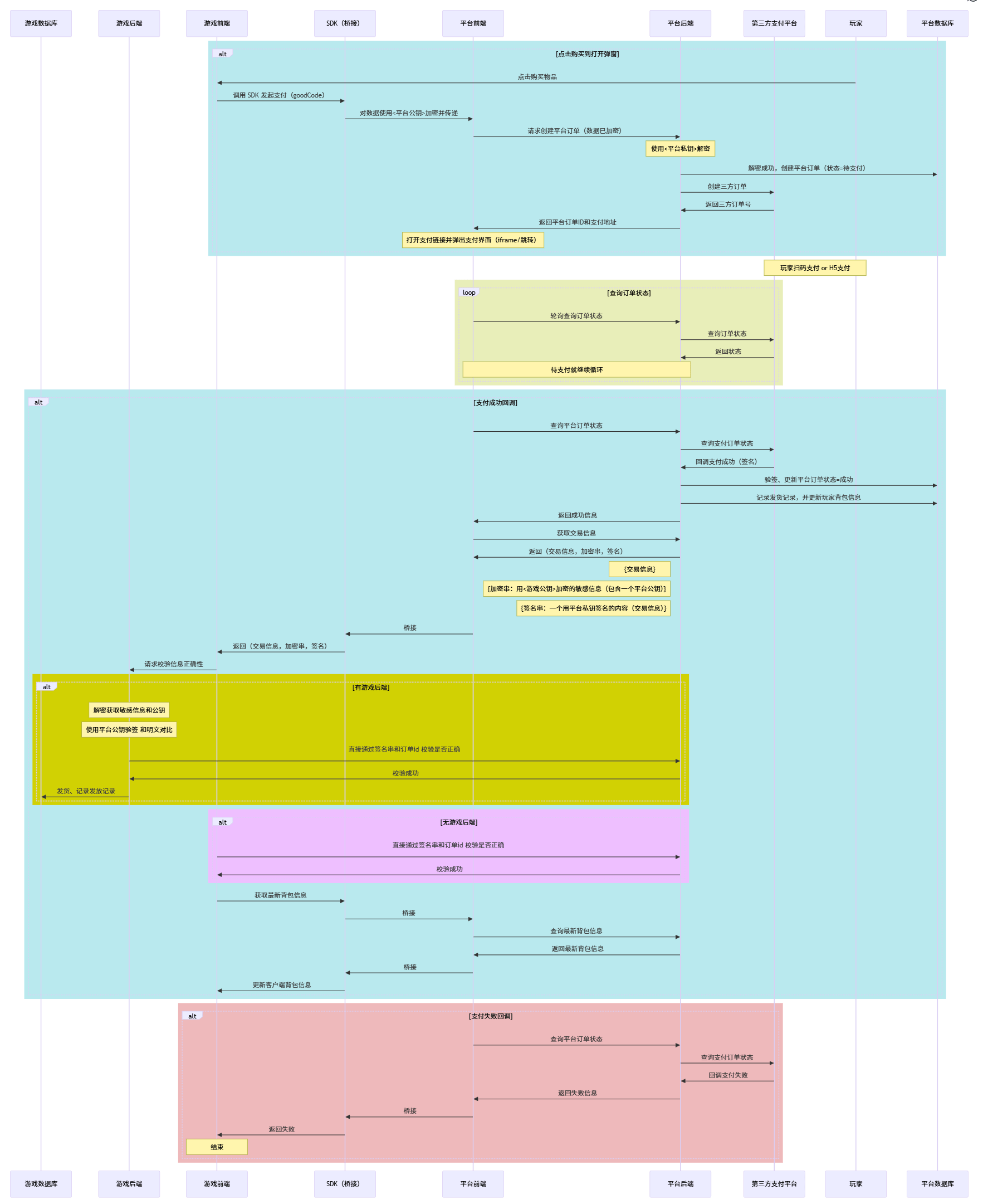
Process Description:
- Place an order: Call
createPayment()to create a payment order and obtain the order ID. - Initiate payment: The SDK automatically redirects to the payment page and the user completes the payment operation.
- Query status: Query the order payment status through the
getPaymentInfo()function in a polling manner. - Result processing: Carry out corresponding processing based on the order status (success/failure/cancellation)
- Data Storage: You can choose to store the order information in the data module according to your own situation, which will facilitate subsequent query and management.
🔐 3. Security Mechanism Description
- Parameter Encryption: Item information is encrypted using asymmetric encryption.
- Automatic Injection: The SDK automatically injects necessary parameters such as
gameIdandrequestTime. - Signature Verification: The platform side verifies the request signature to ensure the request source is trustworthy.
- Secure Transmission: Payment data is transmitted through encrypted channels.
- Result Verification: Payment results contain item information, which can be decrypted and verified for data integrity using the private key provided by the platform.
❓ 4. FAQ
Q:What should I do if createPayment doesn't respond?
A:Check the browser console for any initialization errors. Confirm that the SDK is loaded correctly and the Payment Module initialized successfully.
Q:How to handle payment result notifications?
A:Poll getPaymentInfo(orderId) to query the latest order status and display it to the player.
Q:Is manual decryption required?
A:Item-related information is encrypted. You can decrypt it using the private key provided by the platform.
Q: What are the possible reasons for payment failure?
A: Common reasons include: Payment Module not initialized, missing or malformed parameters, user canceled payment, network exceptions, frequency limits, etc.